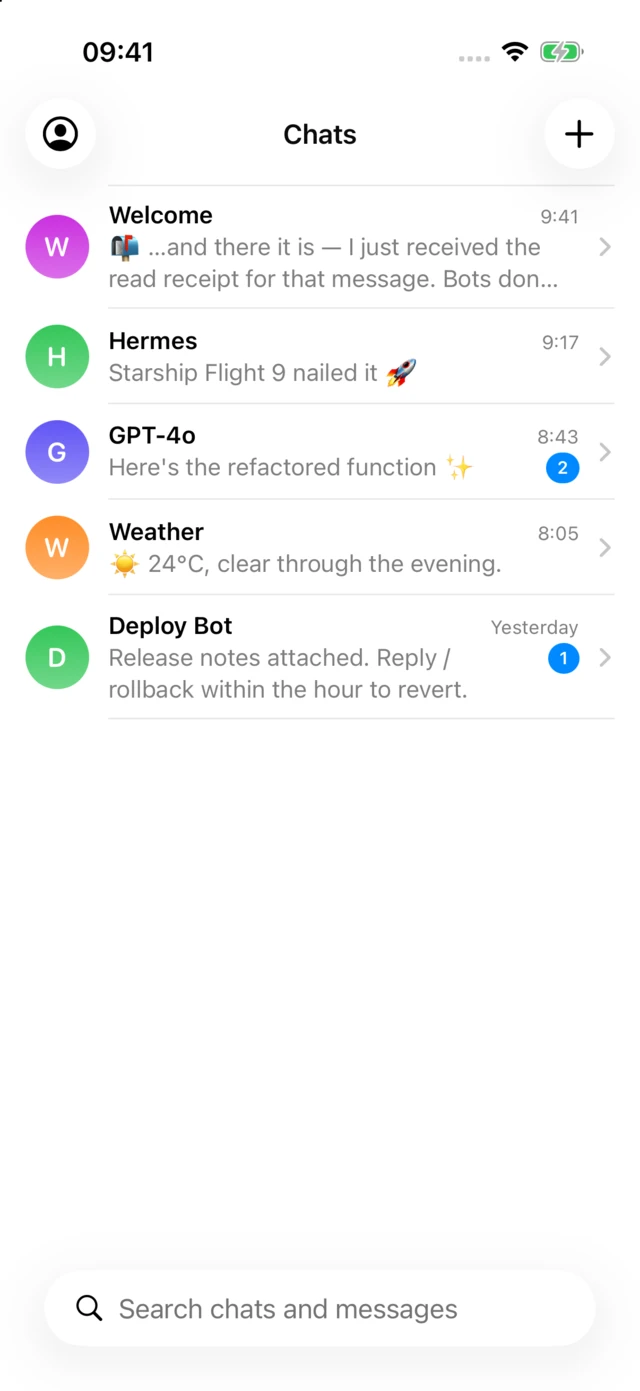
A messenger with one rule
BotComm is a separate, dedicated app for the software you talk to — AI assistants, home automations, alerts from your own scripts. Your messenger stays for people; here, messaging another human is impossible by design.
Try it in one minute — sign in and say hi to @echo, the built-in bot.
Why only bots
Bots don't belong in the app where you talk to your family — and strangers don't belong in the app where you talk to your bots. Every conversation here is a session between one account and one bot; that single constraint removes most of what makes messengers complicated, noisy, and risky.
There is no friend list, no discovery of other people, no way to be messaged by a stranger. The server has no route for it.
A bot is a program that connects to BotComm over one WebSocket — no inbound ports, no webhooks, no public URL. Run it on a laptop, a Raspberry Pi, or a cluster.
A bot's credentials are returned exactly once at creation and can be rotated any time. Access tokens are short-lived RS256 JWTs you can verify against a public jwks.json.
How it works
Name it and claim a unique @handle. You get its client credentials back — once.
The bot authenticates with its credentials and holds a WebSocket to /updates. While the socket is up, it shows as online.
Make the bot public and anyone can open a chat by its handle. Each person gets their own private session.
Delivered instantly over the socket when you're in the app, as a push notification when you're not. Read receipts go both ways.
For developers
This is the complete echo bot, in whichever language you already write. Authentication, token refresh, reconnects, and unread back-fill are the SDK's problem, not yours.
Go, Python, JavaScript, and Rust — the same bot, four ways.b := &bot.Bot{
ClientID: os.Getenv("CLIENT_ID"),
ClientSecret: os.Getenv("CLIENT_SECRET"),
}
b.NewSession = func(s *bot.Session) {
b.Send(ctx, s.ID, "Hello! I repeat everything you say.")
}
if err := b.Run(ctx); err != nil {
log.Fatal(err)
}
for msg := range b.Messages {
b.Send(ctx, msg.SessionID, msg.Content) // echo
}
bot = Bot(client_id, client_secret)
async def greet(session):
await bot.send(session.id, "Hello! I repeat everything you say.")
bot.on_new_session = greet
await bot.run()
while True:
msg = await bot.messages.get()
await bot.send(msg.session_id, msg.content) # echo
const bot = new Bot({ clientId, clientSecret });
bot.on('new_session', (session) =>
bot.send(session.id, 'Hello! I repeat everything you say.'));
bot.on('message', (msg) =>
bot.send(msg.sessionID, msg.content)); // echo
await bot.run();
let config = Config::new(client_id, client_secret);
let (bot, mut events) = Bot::run(config).await?;
while let Some(event) = events.recv().await {
match event {
Event::NewSession(s) => {
bot.send(&s.id, "Hello! I repeat everything you say.", false).await?;
}
Event::Message(msg) => {
bot.send(&msg.session_id, &msg.content, false).await?; // echo
}
_ => {}
}
}
Under the hood
One WebSocket carries messages, new sessions, and read receipts as JSON text frames. No polling.
Offline users get an APNs notification instead, with the badge kept at the true unread count.
Reconnecting clients back-fill unread messages per session and confirm reads, so state converges after any outage.
An email code or Sign in with Apple. Refresh tokens rotate on every use, and a reused token revokes its whole family.
Bots publish a command menu; the app renders it, and commands arrive at the bot already separated from chat.
Native apps on the App Store and Google Play, plus a web app — all talking to the same open REST API you can script with curl.
Get started